
Ready to Defeat Your AML Compliance Obstacles?
Citadel365 Brings Revolution with Secure Solutions to AML Compliance Problems
In the UAE, regulated entities subject to AML/CFT laws are required to register on the goAML portal to report suspicious activities and transactions. This includes:
goAML registration is mandatory and essential for timely reporting by UAE entities subject to AML/CFT obligations. goAML platform makes reporting convenient for UAE FIs, DNFBPs, and VASPs. Regulated entities can file the following reports through the goAML portal:
Failure to register on the goAML portal is a compliance failure to detect and report suspicious activities or transactions related to money laundering and terrorist financing.
Need Help with goAML?
We assist with goAML registration, report preparation, and ensuring regulatory compliance.
Regulated entities in the UAE are required to provide specific documents to register on the goAML system. This includes:
The goAML registration for UAE regulated entities is a two-step process comprising Services Access Control Manager (SACM) and Authenticator Registration and Entity Registration on goAML. The points below explain the process in simple steps:
The first step of registration involves getting the username and SECRET CODE for accessing the Google Authenticator app on the mobile.
A. Register on SACM
Access https://services.uaefiu.gov.ae/sacm/ and complete the form by filling in all the mandatory fields, marked with (*).
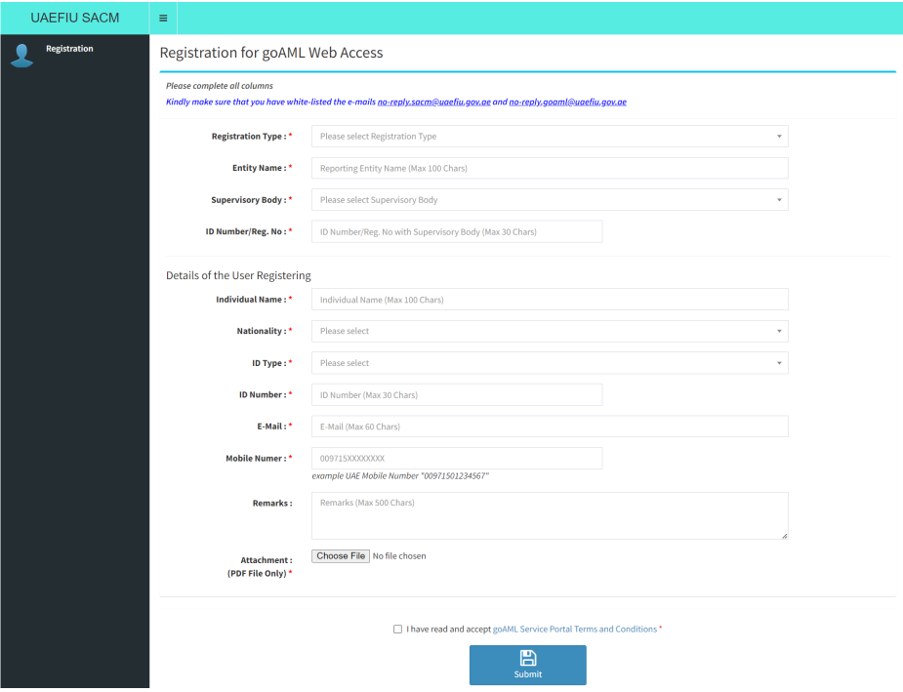
Guide to fill in the details:
B. Verify Email
On clicking submit, you’ll receive an email at your registered email ID, requesting you to verify the email ID. Once submitted, the supervisory authority reviews the request and informs you of approval or rejection. Upon approval, an email shall be sent to the registered email ID with the email OTP and link to generate the Secret Key. You can access the OTP on the registered mobile number as well. Enter the email ID, email OTP, and SMS OTP to get the Secret Key. The OTP is valid for 24 hours only.
If the request is rejected, review the reason, fulfil the requirement and resubmit the request.
C. Configure Google Authenticator
Install the Google Authenticator app on the mobile and set it up by entering the username and Secret Key. The app will generate a 6-digit verification code after activation, which you must enter every time you log in to goAML.
Use https://services.uaefiu.gov.ae/goaml/ and log in with the user ID provided in the SACM registration as the username, and enter the authenticator code (6-digit) as the Password.
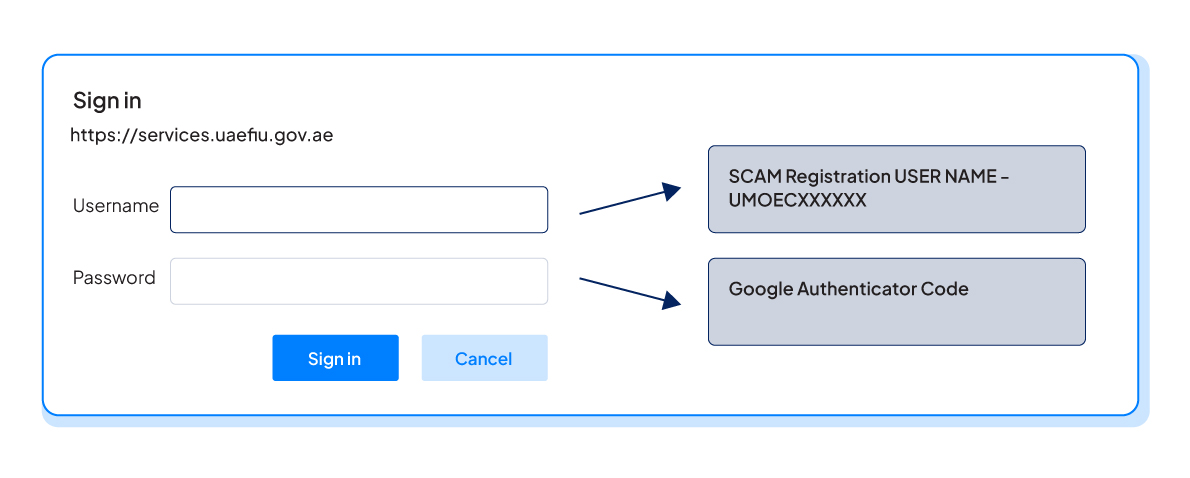
Upon logging in, it will direct you to the goAML Registration Page; select Register. Click on Reporting Entity to select it as the registration type.
Fill in the mandatory details, including the reporting entity, address & phone number of the entity, administrator details, address and phone number of the MLRO/CO, and upload the required documents. Click Preview and Submit.
The system will generate a reference code and send an email with it. Further, once the request is reviewed and approved, the entity will receive an email containing the unique Organisation ID, which is your entity’s unique goAML identity number.
Simplify Your goAML Journey
We help regulated entities complete goAML registration, prepare STR/SAR reports, and provide ongoing regulatory support.
SACM means Service Access Control Manager. It is the mandatory first step in the UAE goAML registration process. It acts as a secure gateway before accessing the main goAML reporting platform. It manages the multi-factor authentication setup and captures the necessary details such as trade license, compliance officer information and others.
Common SACM mistakes include incorrect entity or CO/MLRO details, an invalid email ID or mobile number, incorrect document uploads, and not completing the Google Authenticator setup, which delays the registration process.
Regulated entities receive a username and OTP by email and SMS during SACM registration. These credentials are necessary to log in for the first time, set up the account and activate Google Authenticator.
goAML registration may get rejected due to the following common reasons:
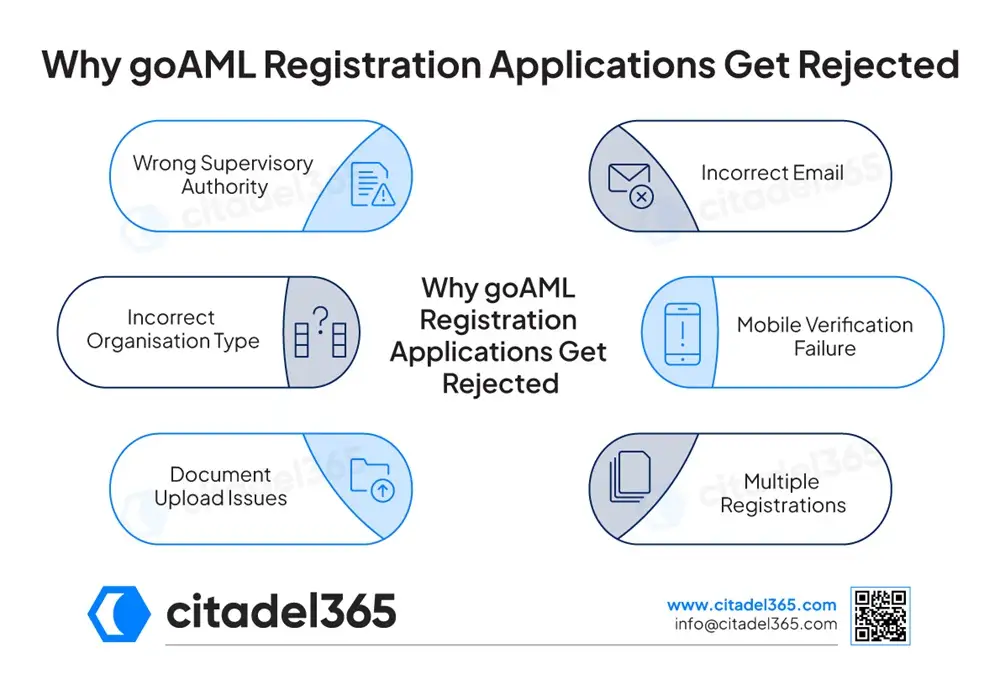
Not knowing the right authority that supervises the business or selecting the wrong authority is a mistake. Ensure choosing the right authority that regulates the business.
Selecting the wrong organisation type can result in registration issues, as it must match the business activities.
Uploading unclear, expired or inconsistent documents may result in rejected applications. Also, upload all documents in a single PDF file.
Using an incorrect or inaccessible email ID restricts the entity from receiving emails, login details and important registration updates.
Entering the wrong mobile number or failing to complete the verification successfully makes it difficult to continue the process.
Only one active goAML registration is required for a business. Creating multiple accounts or submitting multiple requests for the same entity may result in rejection.
The duration for goAML registration depends on factors such as pre-registration timeline, approval timeline, delays and the resubmission process. The regulated entity should gather required documents, appoint a CO or MLRO and complete the SACM account setup to begin with goAML registration.
Further, the supervisory authority reviews the application, which takes time. If no issues are found, approval is generally within a few business days. Further, there can be delays due to missing or incorrect document uploads, or wrong information entered. Sometimes the registration may get rejected, requiring resubmission, which again requires time.
After the registration on goAML is complete, regulated entities may log in through https://services.uaefiu.gov.ae/goaml/.
For the first login, enter the SACM username and the 6-digit code generated by the Google Authenticator app.
For the second login, enter the goAML username and password created during goAML registration.
Registration on the official UAE goAML system is free for regulated entities, involving no charges for all DNFBPs, VASPs, and Financial Institutions.
goAML registration is just the first step to compliance. Regulated entities should also cover the following steps to meet AML/CFT compliance requirements:
Your First Line of Defence Against Financial Crime
We help detect suspicious transactions faster and support well-documented reporting through goAML
goAML Issues | How to Avoid Them |
The 24-hour OTP expires before you enter it. | Ensure you complete the steps the same day you receive it. Or, request a new OTP and enter it as soon as you receive it. |
Unable to upload files during registration. | Ensure you merge the files in a single PDF. |
Organisation does not appear during registration. | Confirm selected the correct supervisory authority and entered the right business details. |
The verification email is not received. | Make sure to white-list emails no-reply.sacm@uaefiu.gov.ae and no-reply.goaml@uaefiu.gov.ae. |
Frequently Asked Questions
goAML registration is the process of registering on the goAML portal to report suspicious financial activities.
Consultants may assist regulated entities in the UAE to register on the goAML portal. The consultant may aid in preparing documents, completing the application and guiding throughout the process.
Yes, mainland companies subject to AML/CFT regulations are required to register on the goAML platform. It helps UAE financial institutions, DNFBPs, and VASPs to report suspicious activities or transactions without delay and prevent financial crime.
No, every reporting entity should use their own unique email ID and mobile number for goAML registration. Using one email by multiple companies can cause errors or rejections. Therefore, it is recommended that every regulated entity have one email address to receive verification messages, login credentials and other related information via goAML.

Sridhar is a Certified Anti-Money Laundering Investigator (CAMI) with over 30 years of experience in compliance, risk, and audit, including more than 20 years in AML and financial crime prevention. He has contributed to the development of UAE regulatory standards through the FERG sub-committee and has maintained active engagement with the Central Bank of the UAE on supervisory and compliance matters.